On this page
Background
What is Pump.fun?
Pump.fun is a Solana launchpad where anyone can deploy a token in about a minute with no presale, no team allocation and no liquidity to seed. Every token starts on a bonding curve: buyers push the price up along a fixed formula, and once enough has been bought the token “bonds” and migrates to a decentralised exchange with real liquidity.
Traders focus on early launches because the bonding curve prices the first buyers at a few thousand dollars of market cap. A token that reaches a $1M cap has already delivered a large multiple to anyone who entered on the curve. That is the entire appeal, and it is why thousands of tokens launch every day.
Speed matters because these windows are measured in seconds. A launch that finds attention can move from $5K to $60K before you finish reading the token description, and the same move can reverse just as fast. Winning here is less about picking the right token and more about having a repeatable process that surfaces qualified launches instantly and lets you act on them without friction.
Tooling
Why Use Terminal Instead of Trading Directly?
You can buy Pump.fun tokens on the Pump.fun website with a browser wallet. It works, and it is fine if you buy one token a week. It falls apart the moment you try to trade the feed, because you are refreshing a page, approving every transaction manually and reading almost none of the data that decides whether a launch is worth touching.
Terminal, formerly Padre, is built by the Pump.fun team as a trading front end for exactly this workflow. Six things make the difference in practice:
Faster execution
Terminal routes orders through its own infrastructure with configurable priority fees and tips. On a launch that moves 40% in ten seconds, the difference between a one-click buy and manually approving a swap in a browser wallet is the difference between an entry and a chase.
Built-in wallets
You trade from wallets that live inside Terminal, so there is no extension popup and no signature prompt on every buy. You generate a trading wallet, fund it, and every order after that is a single click.
Trenches discovery
Trenches is a live three-column feed of new, nearly-bonded, and migrated launches. Instead of refreshing Pump.fun and scrolling, you watch a filtered stream that only shows tokens matching your criteria.
Security indicators
Every token page shows dev holdings, top 10 concentration, insider and sniper holdings, bundled supply, mint authority, and freeze authority. Those six numbers filter out most of the obvious traps before you ever place an order.
Deep filters
Protocol, audit, metrics, and social filters can be stacked and saved as presets. This is the core of the workflow: you are not looking for good tokens, you are removing the 95% that are not worth a look.
Multi-wallet support
Group multiple trading wallets, keep withdrawal wallets separate, and split size across them. Useful for scaling into launches and for keeping your PnL per strategy readable.
Set up Terminal with 35% lifetime cashback
Sign up through this link and you keep 35% of your trading fees instead of the standard 10%. It applies to every trade you make from then on.
Step 1
Create Your Terminal Wallet
After signing in, open Portfolio and go to Wallets. This page is where every wallet you trade from lives.
Click Create in the Trading Wallets panel and Terminal generates a fresh Solana wallet for you instantly - no seed phrase to write down before you can start, no extension to install.
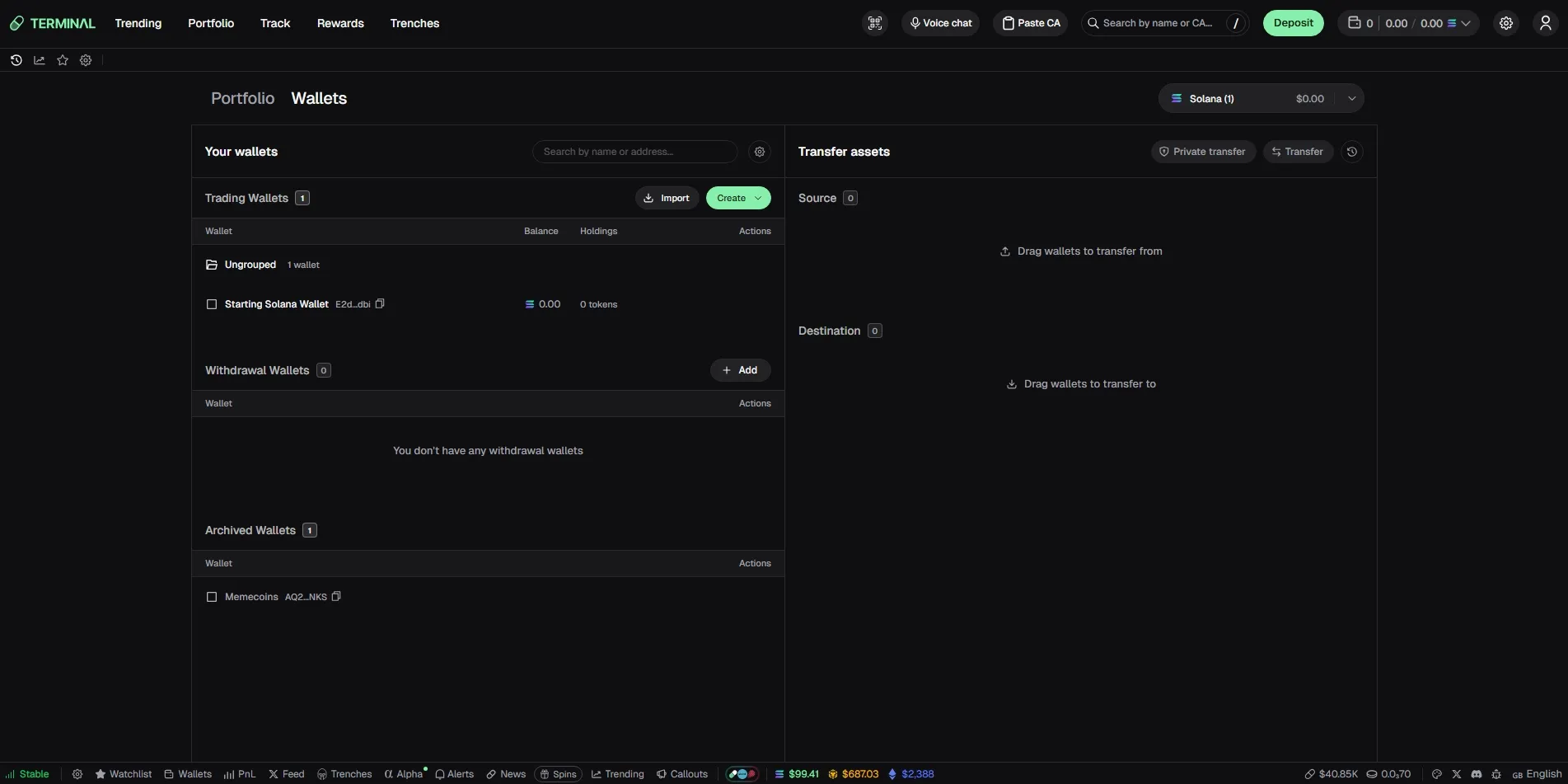
You will see two wallet types, and the distinction matters:
Trading Wallet
A hot wallet that Terminal controls for you. This is what actually executes buys and sells, which is why it can trade in one click with no signature prompt. Fund it with what you intend to trade, not with your whole balance.
Withdrawal Wallet
An external wallet you control, such as Phantom, a Ledger, or an exchange deposit address. Save it as your withdrawal destination. It never places trades - it's simply where you send profits when you move funds out of Terminal.
Start with a single trading wallet. One wallet keeps your PnL readable while you learn the feed, and Terminal lets you add more later and group them once you actually need multi-wallet execution. Add a withdrawal wallet on day one too, even if you do not use it yet, because deciding where profit goes before you have any is much easier than deciding it mid-trade.
Step 2
Export Your Wallet (Optional)
Because a Terminal trading wallet is generated for you, it is worth knowing how to take the key with you.
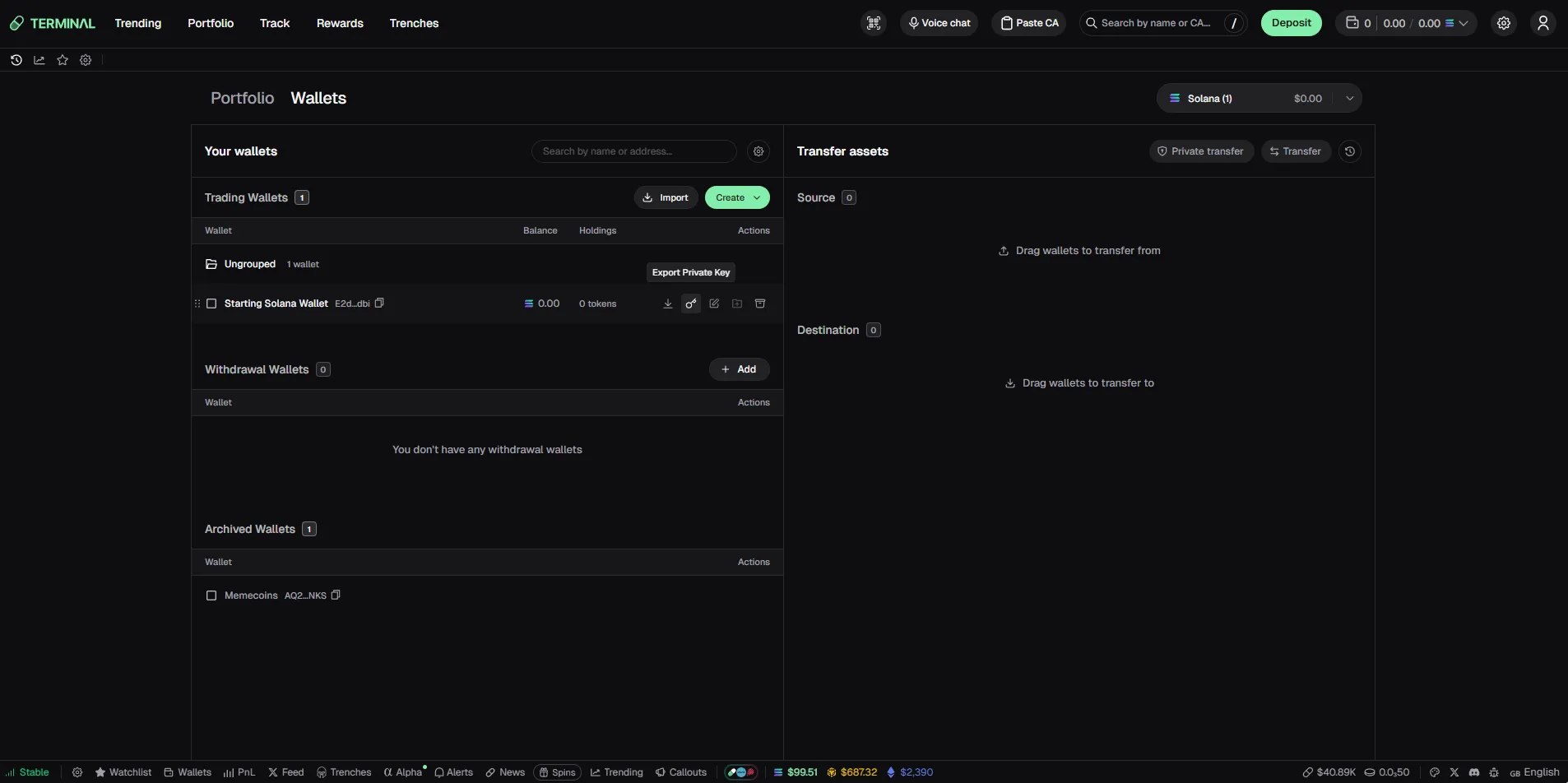
In the Wallets page, find your trading wallet row and use the export action to open the Export Private Key option to make sure you always have access to your funds.
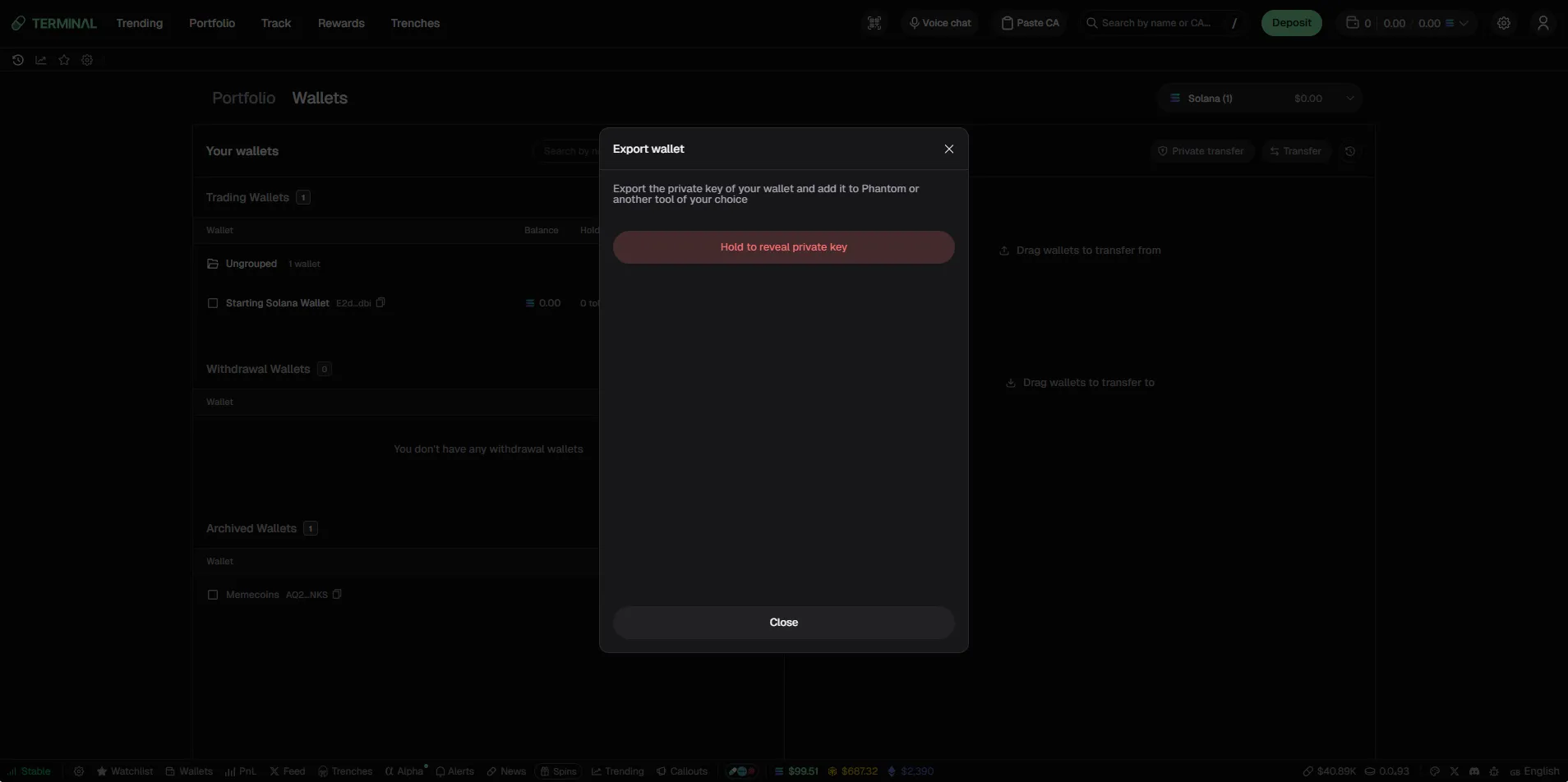
Terminal then opens an export dialog with a deliberate friction step: you have to hold the button down to reveal the key. That is intentional. It prevents an accidental click from putting your private key on screen while you are screen-sharing or streaming.
Once revealed, that key can be imported into Phantom, Solflare or any Solana wallet. Two reasons to do it: you keep a backup that is independent of your Terminal account, and you can move tokens or SOL out from a wallet you control directly if you ever need to.
Store it offline. A password manager entry or an encrypted note is fine. A screenshot in your camera roll, a Telegram message to yourself, or a plain text file on your desktop is not.
Your private key is your funds
Anyone who has this string can move every asset in the wallet, permanently and irreversibly. There is no support ticket that reverses it.
Never paste it into a website, a Discord DM, a “wallet verification” form, or any tool promising to check your balance. Every single one of those is a drainer. Terminal will never ask you for it.
Step 3
Deposit SOL
Trading on Pump.fun is denominated in SOL, so your trading wallet needs SOL before it can do anything. Copy the wallet address using the copy icon next to it in the Wallets page, or use the Deposit button in the top navigation which shows the same address with a QR code.
Send SOL to that address from an exchange withdrawal or from another Solana wallet. Make sure you are sending on the Solana network—SOL sent over a wrapped or bridged network to a native Solana address does not arrive. Transfers usually confirm in a few seconds and the balance in Terminal updates on its own.
Then the part almost everyone gets wrong on their first day: keep some SOL free for fees. Every buy and sell on Solana costs a base fee plus whatever priority fee and tip you have configured, and during busy periods those tips are what get your transaction included in the block you want. If you deposit exactly 0.5 SOL and try to buy with 0.5 SOL, the transaction fails.
Step 4
Open Trenches
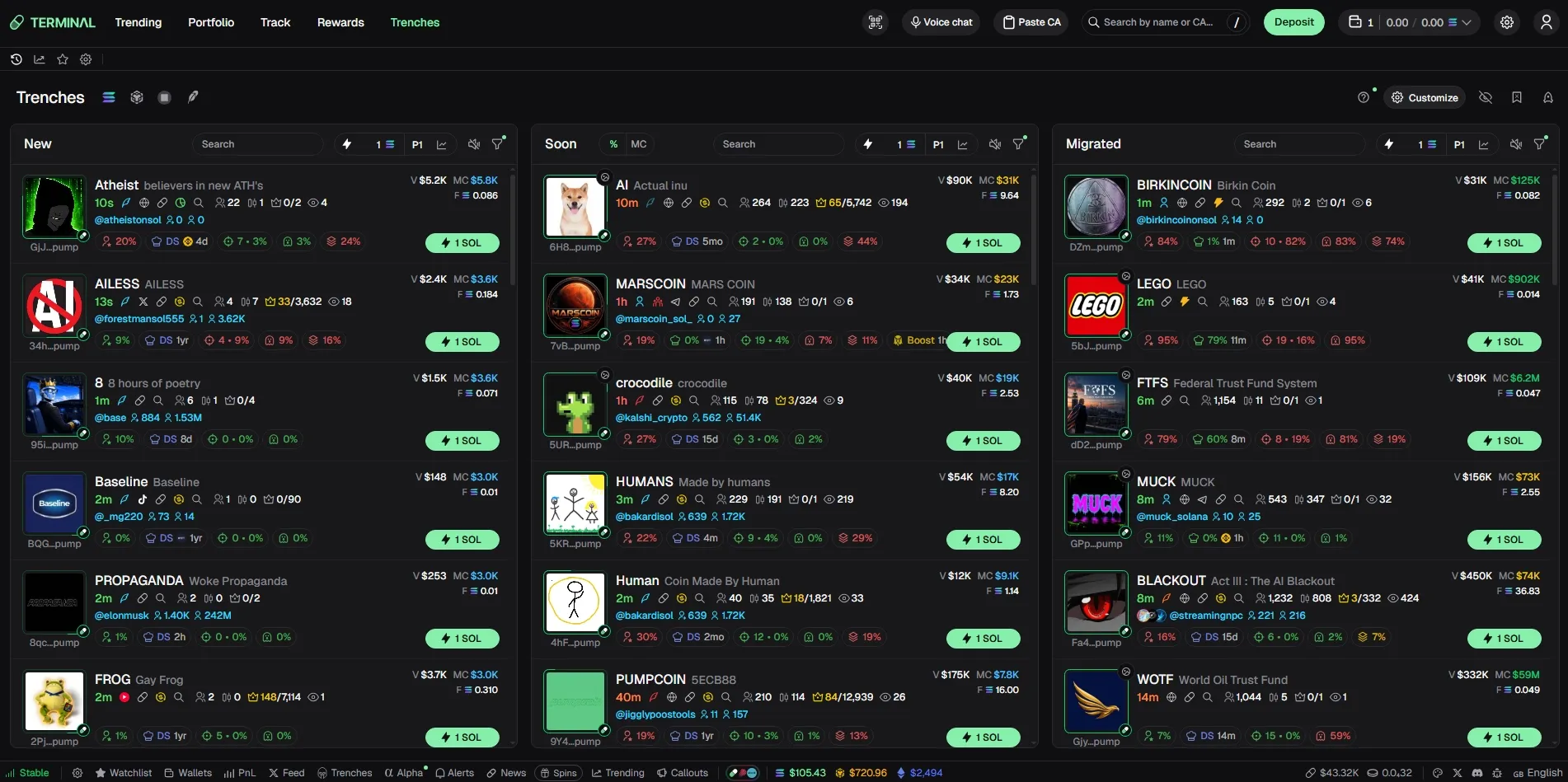
Trenches in the top navigation is where you will spend most of your time. It is a live three-column feed of Pump.fun launches, shown in the featured screenshot at the top of this guide, and each column represents a different stage of a token's life.
Every row packs the data you need to make a decision without opening the token: market cap, volume, holder count, dev holding, top 10 concentration, insider and sniper percentages, socials, age, and a one-click buy button with your preset SOL amount. Learning to read a row at a glance is most of the skill.
01New
Tokens that just deployed on Pump.fun and are still on the bonding curve. This is the earliest and riskiest stage. Market caps are usually in the $3K–$15K range, liquidity is thin, and most of these tokens go to zero within minutes. This is also where the largest multiples come from, which is exactly why filters matter here more than anywhere else.
02Soon
Tokens close to completing their bonding curve and migrating to a DEX. The column is sorted by progress, so it shows you what the market is actively buying right now. Entries here are more expensive than New but the token has already proven it can attract real buyers, which removes a large slice of the risk.
03Migrated
Tokens that finished the curve and now trade with real DEX liquidity. Charts are readable, volume is verifiable, and holder counts are meaningful. This is the most forgiving column for beginners because you can size a position without being the only buyer in the book.
If you're new, spend a few days watching the Migrated column before trading New tokens.
The pace is slower, tokens are at higher market cap and the data is more reliable, and you'll quickly get a feel for what healthy holder counts and dev percentages actually look like.
That makes it much easier to set useful filter thresholds later.
Step 5
Best Filters for Pump.fun
This is the section that decides whether you make money. Thousands of tokens launch on Pump.fun every day and the overwhelming majority are noise; clones, bundled launches, recycled socials, deployer wallets running the same script for the fortieth time. Your filters are not there to find winners. They are there to delete the noise so the handful of launches worth attention become visible.
Open the filter icon in the top-right of any Trenches column. The panel has tabs for Protocols, Audit, Metrics, Vitals and Socials, and each column keeps its own filter set.
Here is every setting that matters, tab by tab.
Tab 1 of 4
Protocols and quote tokens
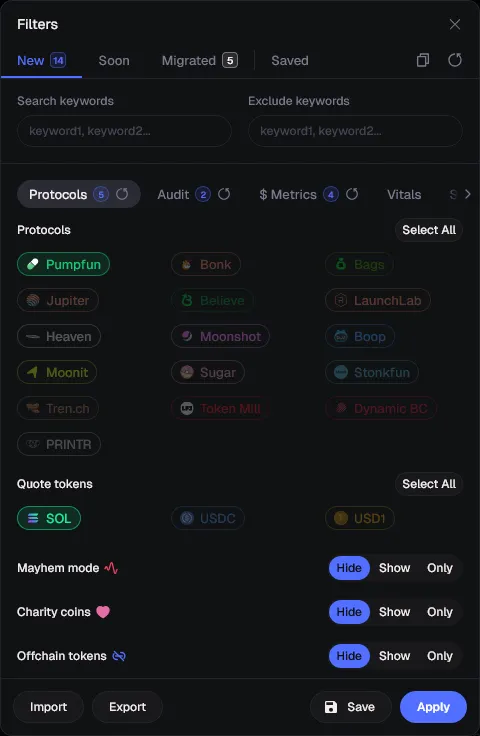
This tab decides which launchpads and pairs enter your feed at all. Everything downstream is filtered from this pool, so start narrow.
- Protocols
- Select Pumpfun only. Bonk, Bags, Jupiter, LaunchLab, Moonshot, Heaven and the rest each have their own flow and dev behaviour. Mixing them makes the feed unreadable and makes your filter thresholds meaningless.
- Quote tokens
- Select SOL. USDC and USD1 pairs on new launches are rare and usually have worse routing. Keeping SOL only also means your PnL is denominated in one asset.
- Mayhem mode
- Set to Hide. Mayhem launches are high-noise and heavily bot-driven. They are not impossible to trade, but they are not where you learn.
- Charity coins
- Set to Hide. The theme attracts low-effort clones with almost no organic holder base.
- Offchain tokens
- Set to Hide. If it is not settling on chain the way the rest of the feed does, the data you are filtering on is not comparable.
Tab 2 of 4
Audit filters
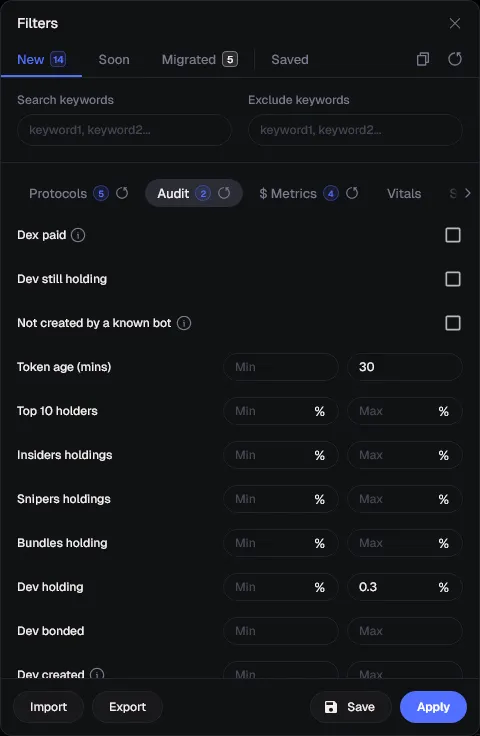
This is the tab that protects your capital. Audit filters read on-chain supply distribution and reject tokens where someone is positioned to dump on you.
- Token age (mins)
- Set the max to 30. Anything older than half an hour that still has not migrated has already failed to find buyers. Fresh age is the single most useful filter in the panel.
- Dev holding
- Set the max to 0.3%. A dev holding 5% of supply is a guaranteed sell wall. Under 0.3% means the deployer cannot meaningfully rug the chart, only the narrative.
- Top 10 holders
- Optional at first. Once comfortable, cap it around 25–30%. Higher concentration means a handful of wallets control the price action.
- Insiders holdings
- Wallets connected to the deployer. Anything above 30% is a coordinated launch and should be treated as such.
- Snipers holdings
- Supply bought in the first block or two. High sniper holdings means you are buying the exit liquidity for bots that got in at $2K.
- Bundles holding
- Supply bought in a single bundled transaction. Bundled launches usually unload together, which produces the vertical red candle you have seen before.
- Dex paid / Dev still holding / Not created by a known bot
- Leave these unchecked while you are learning. They are useful refinements later, but each one shrinks the feed and on a slow hour you can filter yourself down to zero tokens.
Tab 3 of 4
Metrics filters
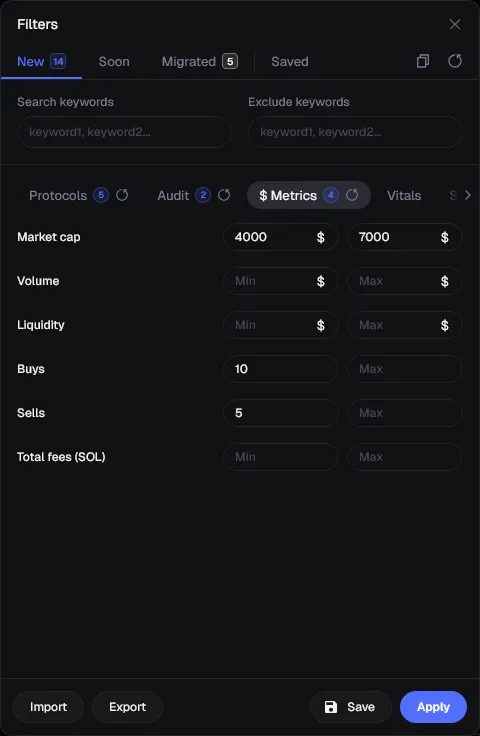
Metrics define the window you want to enter in. The goal is to catch a token after it has proven demand but before the crowd arrives.
- Market cap
- Set 4,000 to 7,000. Below $4K the token has essentially no buyers yet and you are guessing. Above $7K on a fresh Pump.fun launch you are paying for someone else’s entry. This band is the practical sweet spot for early entries.
- Buys
- Set the minimum to 10. Ten distinct buys is the smallest signal that anything organic is happening. Below that, the chart is one wallet talking to itself.
- Sells
- Set the minimum to 5. This one is counter-intuitive. A token with buys and zero sells is often bundled or bot-held, because real holders always take profit. Some sell pressure is a sign of a real market.
- Volume
- Leave open at first. Volume correlates heavily with market cap at this stage, so filtering both usually just narrows the feed without adding information.
- Liquidity
- Leave open on New launches, since liquidity is a function of curve progress. Add a floor when you trade the Migrated column, where thin liquidity means real slippage.
- Total fees (SOL)
- A quick proxy for how much trading has actually occurred. Useful as a secondary sort once you know what a normal value looks like for your band.
Tab 4 of 4
Social filters
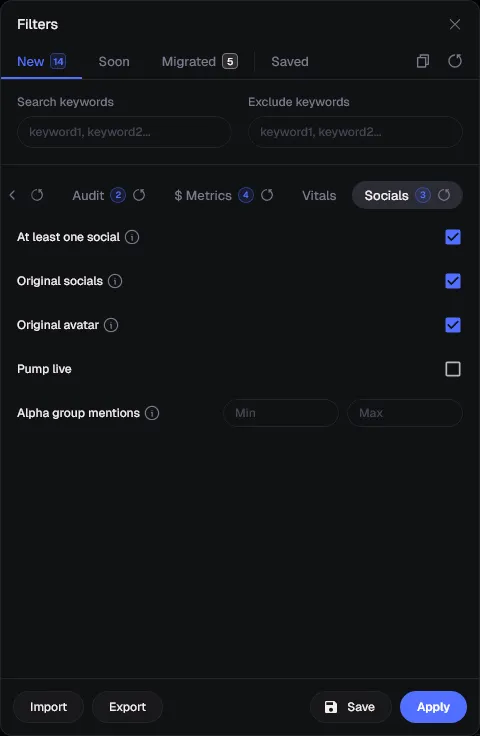
Social filters are the cheapest quality signal available. Most throwaway launches recycle another project’s handle or profile picture, and these three checkboxes remove almost all of them.
- At least one social
- Enable. A token with no X account, Telegram, or website has no distribution plan and therefore no path to attention.
- Original socials
- Enable. This rejects tokens reusing a social account that has already been attached to a previous launch. Recycled handles are the most common tell of a serial deployer.
- Original avatar
- Enable. Reverse-image duplicates are copy-paste launches. If the deployer could not be bothered to make an image, they will not be bothered to build anything either.
- Pump live
- Leave off by default. Livestreamed launches can run hard, but they are a different game with different risk, and they will flood a feed that is otherwise clean.
- Alpha group mentions
- Set a minimum once you understand your call channels. Early mentions can front-run price, but a high threshold means you are entering after the call has already been distributed.
Copy this
Recommended starter filter
Apply this to the New column, save it as a preset, and trade it for a week before you change anything. Then adjust one variable at a time so you can actually tell what each change does to your feed.
Protocols
- Pump.fun
- SOL
- Hide Mayhem
- Hide Charity
- Hide Off-chain
Audit
- Token age under 30 minutes
- Dev holding max 0.3%
Metrics
- Market cap 4K–7K
- Buys 10+
- Sells 5+
Socials
- Original socials
- Original avatar
- At least one social
One warning about filters: it is possible to over-filter yourself into an empty feed. If nothing has appeared in ten minutes, you have not found a quiet market, you have set thresholds that no token can satisfy at once. Relax the market cap band or the token age first, since those are the two that narrow the pool fastest.
Trade this setup with 35% cashback
Filters cut your losses. Cashback cuts your costs. Create your Terminal account through this link to keep 35% of every fee you pay.
Step 6
Buy Your First Token
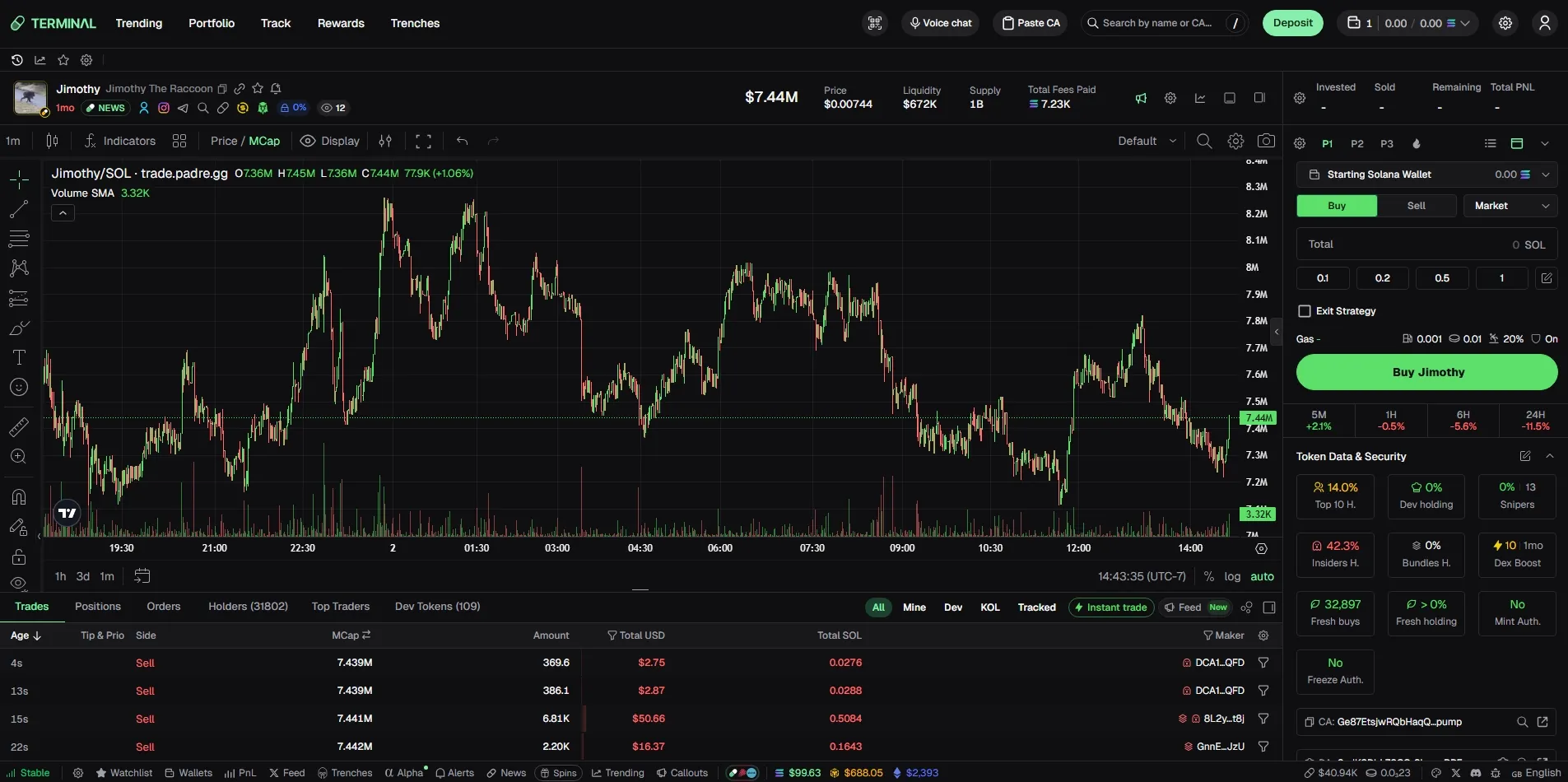
Click any token in Trenches or paste the token's CA and Terminal opens the trading view: chart on the left, buy panel on the right, live trades and holders below. Everything you need to decide is on one screen.
1. Select your wallet
At the top of the buy panel, confirm the wallet dropdown shows the trading wallet you funded and its SOL balance. If you run multiple wallets, this is the step that gets skipped and the reason a trade fails.
2. Enter your SOL amount
Use the preset buttons (0.1, 0.2, 0.5, or 1 SOL), or enter your own amount. You can edit the presets anytime, so set them to the position sizes you actually use. For your first few trades, keep the size small while you learn how the market behaves.
3. Check gas and slippage
The gas row shows your priority fee, tip and slippage tolerance. Defaults are reasonable for normal conditions; raise the tip when the network is congested or your transactions will land late, which on a fast launch means a worse fill.
4. Read the security panel before you click Buy
Under Token Data & Security, focus on Top 10 Holders, Dev Holding, Snipers, Insider Holdings, and Bundled Holdings. These numbers give you a quick read on how the supply is distributed before you enter.
If the concentration looks unusually high, it's usually a good reason to skip the token.
Pump.fun tokens are generally the safer choice because they follow the standard Pump.fun launch flow. Custom-launched Raydium tokens can still be legitimate, but they're more likely to include honeypots or other scams.
You can quickly tell if a token launched on Pump.fun by checking the token avatar - genuine Pump.fun launches have a small Pump.fun logo in the top-left corner.
5. Buy, and plan the exit
Press the green buy button and the order goes out from your trading wallet without a wallet popup. Your position appears in the Positions tab immediately. Decide your take-profit and your invalidation before you enter, or set an exit strategy in the panel—deciding while the chart is moving is how small losses become large ones.
Do not ape every token
Your filters produce candidates, not signals. Most launches that clear a good filter set still fail, so the point of the security panel is to reject candidates, not to confirm them.
Trading every row that appears in your feed is the fastest way to burn a balance. Fixed size, a real reason for each entry, and the willingness to skip an entire session are what separate traders from gamblers here.
Avoid these
Beginner Mistakes
Almost every account that blows up on Pump.fun does it through the same five mistakes. None of them are about picking bad tokens.
Buying too late
The most expensive habit in memecoin trading. You see a token at $60K that was $6K four minutes ago and buy because it is "clearly working." You are buying from the people who entered at $6K. If a token has already run 10x, your risk-to-reward has inverted. Either you were in the band your filters defined, or you skip it.
Ignoring dev holding
Everything about a launch can look right and a 6% dev bag will still ruin it. Check the token data panel before every buy. Dev holding, insider holding, sniper holding, and bundled supply take four seconds to read and they explain most sudden 70% drawdowns.
Forgetting gas fees
Depositing 1 SOL and trying to buy with 1 SOL fails. Priority fees and tips come out of the same balance, and on a busy block you need them to be high enough to land. Keep 0.01–0.03 SOL untouched in every trading wallet purely as fee headroom.
Chasing green candles
A vertical candle on a fresh launch is usually a bundle unwinding or a single large buy, not the start of a trend. By the time it renders on your chart, the move is priced in. Trade the setup your filters surfaced, not the candle your eye caught.
Risking too much capital
Most early Pump.fun launches go to zero. That is not pessimism, it is the base rate. Position sizes should assume a total loss, which means fixed size per trade, no averaging down into a dying chart, and no size you would be upset to lose. Traders survive this market by having a lot of small losses and a few large wins.
Level up
Advanced Tips
Once the basic loop feels like second nature - filter, analyze, buy, exit - this is how you level up.
Multi-wallet trading
Split size across several trading wallets instead of committing one large order. It lets you scale into a position, keeps each strategy’s PnL separate and readable, and means a single compromised or drained wallet is not your whole balance. Group them in the Wallets page so you can switch without hunting for addresses.
Wallet tracking
Terminal’s Track page lets you follow specific wallets. Find wallets that consistently entered profitable launches early, add them, and treat their buys as a signal layered on top of your filters. A wallet with a real track record is a better filter than any metric threshold.
Copy trading
Once you trust a tracked wallet, you can mirror its entries and sells. Use small fixed size and hard caps. Copy trading inherits the other trader’s risk appetite along with their edge, and their sizing was chosen for their balance, not yours.
Faster entries
Save preset buy amounts, raise priority fee and tip during congested periods, and set an exit strategy before you enter rather than deciding under pressure. Instant trade in the Trades tab removes the confirmation step entirely once your presets are dialled in.
Combining filters with wallet tracking
This is the actual edge. Filters give you a clean pool of launches; tracked wallets tell you which one in that pool has smart money in it. When a token clears your audit and metric thresholds and a wallet you trust has just bought, that is the highest-conviction setup available on Pump.fun.
Worth knowing what else is out there, too. Terminal is not the only Solana trading platform, and the right choice depends on whether you value execution and filter depth or copy trading and mobile access. These comparisons go through it feature by feature:
Terminal vs Axiom
How the two workspaces compare for chart-first versus feed-first traders.
Terminal vs GMGN.AI
Execution speed and filters against Smart Money tracking and copy trading.
Terminal vs FOMO
A lighter interface against Terminal’s deeper filter and wallet tooling.
Homepage
Return to the main Terminal review with features, filters, cashback, and platform overview.
Watch
Watch the Full Sniping Tutorial
Everything above in one recording: the wallet setup, the exact filter values, and a live walkthrough of finding and entering a new Pump.fun launch on Terminal.
Prefer watching on YouTube? Open the sniping tutorial.
Ready to run this setup yourself?
Create your Terminal account through this link for 35% lifetime cashback on trading fees, then follow the steps above in order.
Answers
Pump.fun trading FAQ
Is Pump.fun safe?
The Pump.fun contract itself is well-established and its bonding curve mechanism works as advertised, so the platform is not the risk. The tokens launched on it are. Anyone can deploy in under a minute, which means most launches are low-effort or outright predatory. Safety on Pump.fun comes from your process: check dev holding, insider and sniper holdings, bundled supply, and mint or freeze authority before buying, and only trade size you can afford to lose entirely.
Do I need Phantom?
No. Terminal generates its own trading wallets, so you can fund a Terminal wallet directly from an exchange or another Solana wallet and trade without any browser extension. Many traders still keep Phantom as a cold-side wallet for holding profits, and Terminal lets you export a private key at any time if you want to import a Terminal wallet into Phantom later.
How much SOL should I start with?
Start with small amounts while you learn the fundamentals of memecoin trading. Always leave 0.01 to 0.03 SOL in your wallet for priority fees and tips, and increase your trade size only after your strategy has produced consistent results.
What is the best Pump.fun trading terminal?
Terminal, formerly Padre, is built by the Pump.fun team, which is why its Trenches feed, security indicators and execution are tightly aligned with how Pump.fun launches actually behave. GMGN.AI is stronger for copy trading and mobile, Axiom appeals to traders who want a more chart-first workspace, and FOMO is lighter weight. For discovering and entering brand new Pump.fun launches specifically, Terminal’s filter depth and one-click execution are the most complete combination.
How do I find new launches?
Open the Trenches page and work from the New column, which streams tokens still on the bonding curve. Apply your filter preset so the column only surfaces launches matching your protocol, audit, metric and social thresholds, then use the Soon column for tokens close to migrating and Migrated for tokens already trading on a DEX. Wallet tracking on the Track page adds a second discovery layer by showing you what proven wallets are buying.
What are the best Terminal filters?
I use these filters for new launches because they keep the feed cleaner without hiding too many opportunities. My starting preset is Pump.fun only, SOL pairs only, token age under 30 minutes, dev holding under 0.3%, market cap between 4K and 7K, and at least 10 buys and 5 sells. If you're just getting started, I'd recommend trading migrated tokens at higher market caps first. They're generally easier to read than brand-new launches, and you can tighten or loosen one filter at a time as you get more comfortable.